这个数据包来源于以前的一个叫电影视角的数据包。这个数据包是在原有基础数据包的基础上加以改进制作而成的数据包。原有的数据包只能操控玩家的位置和视角,现在的数据包能够操控更多实体。现在的数据包还能支持自定义的计分板,以便更好地和其他的数据包结合使用。同时,数据包用于生成函数用的小程序也进行了优化,修复了大量的bug。接下来是对数据包的详细介绍。
原理
一般来说,要实现一个物体的平滑运动会采用类似execute at @s run tp @s ~0.1 ~ ~ 的方法。这样的好处是非常的直接和简洁,但是坏处就是,这样的递归在运用到非常复杂的曲线轨迹的时候将会变得很困难。于是我们转念一想,既然都是tp,都是20tick/s,为什么不直接算出所有的位置点,然后用计分板作为计时器,挨着挨着穷举出来,然后进行tp呢?例如下面这样:
execute if score \$SV_timer_circle SV_timer matches 0 at @e[tag=center] run tp @e[tag=rander] ~0 ~0 ~0 ~0 ~0
execute if score \$SV_timer_circle SV_timer matches 1 at @e[tag=center] run tp @e[tag=rander] ~3.12868930080462 ~9.87688340595138 ~0 ~0 ~0
execute if score \$SV_timer_circle SV_timer matches 2 at @e[tag=center] run tp @e[tag=rander] ~6.18033988749895 ~9.51056516295154 ~0 ~0 ~0
#...
这样的好处便是,显而易见的能轻松应对任何复杂的轨迹,因为任何复杂的轨迹在某一时间点的位置总是能用一个具体的三维向量来表示的(当然这里指的是绝对运动,不考虑相对的运动等)。但是缺点同样也是显而易见的,那就是命令数过多,函数过于冗长。比如,我们要进行一段长达三分钟的曲线运动,那么就会有3*60*20=3600个tick的位置需要我们计算出来,也就是每tick至少需要执行3600条命令,而这无疑是巨大的性能开支。这便是我们着重需要优化的点。
假设就是一段3600tick长的曲线,总共3600个条命令,每条命令对应一tick。现在我们优化一下,将这些时间分一下段。比如,前1800和后1800分开。在666tick时,我们检测到它在1~1800段,于是就只在1~1800中穷举判断,这样每tick就只需要执行1802条命令了,整整少了一半!我们可以继续划分下去,比如化成3段,就减少到了1203;化成4段,就减小到了904……但是显然是不能一直划分下去的,因为比如划分到1200段时,用于穷举区分区间段的命令行数已经达到了一个相当客观的数目,让总命令数再一次达到了1203。所以,我们要找到便是这样一个极值点,让总命令数最少。经过数学手段分析,最少的时候正好是时间的平方根,对于本例子来说,就是60,这样下来,每tick只需要120条命令,仅仅是原来的百分之三左右。
更进一步,我觉得穷举区间段的命令数也太多了,为什么不继续合并区间呢?这样就能达到更好的效果了。例如对于更大的例子,10000tick,上述优化以后仅仅只有200条命令/tick,如果我们对区间进行进一步的合并分类,比如化成10*10,那么就只需要120条/tick,甚至比上面3600tick还要少!
大胆一些,上面的划分区间明显不均匀,是10*10*100的,根据已有的经验,是不是更多次方的开根能让分段更加均匀呢,从而让命令数目变得更短呢?是的!我们直接划分为10*10*10*10,即10000的四次方根,那么命令数就从原来的10000缩减到了40,达到了惊人的不到百分之零点五!
我们设开根的次方为分类层数n,那么可以总结出,每tick需要执行的命令的数目可以表达为f(x)=n\sqrt[n]{t},n为整数。接下来,我们把n从1选取到5,查看此方法的优化程度。
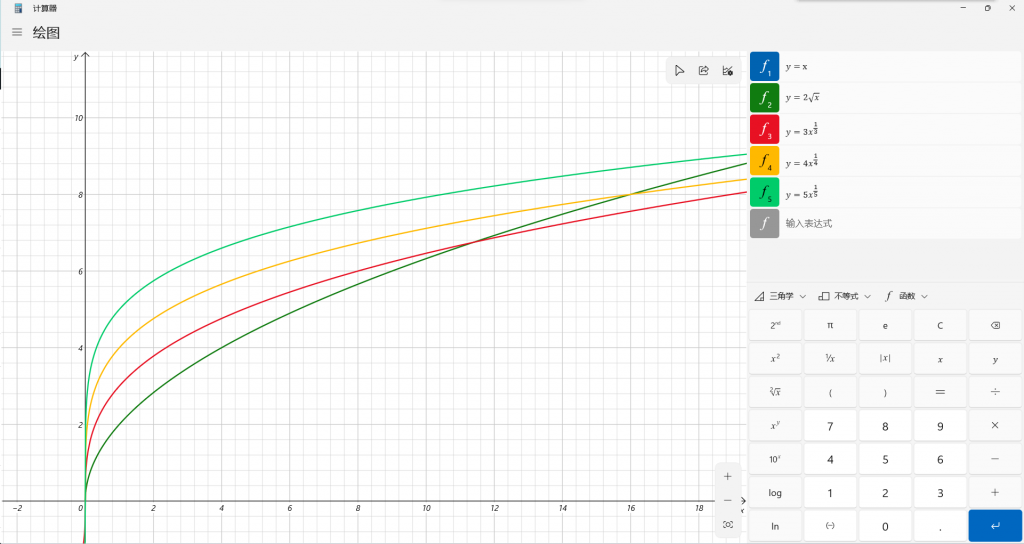
可以看到一开始,当tick较少的时候,n越小总的命令数y越小。但是随着x(即tick数)增大的时候
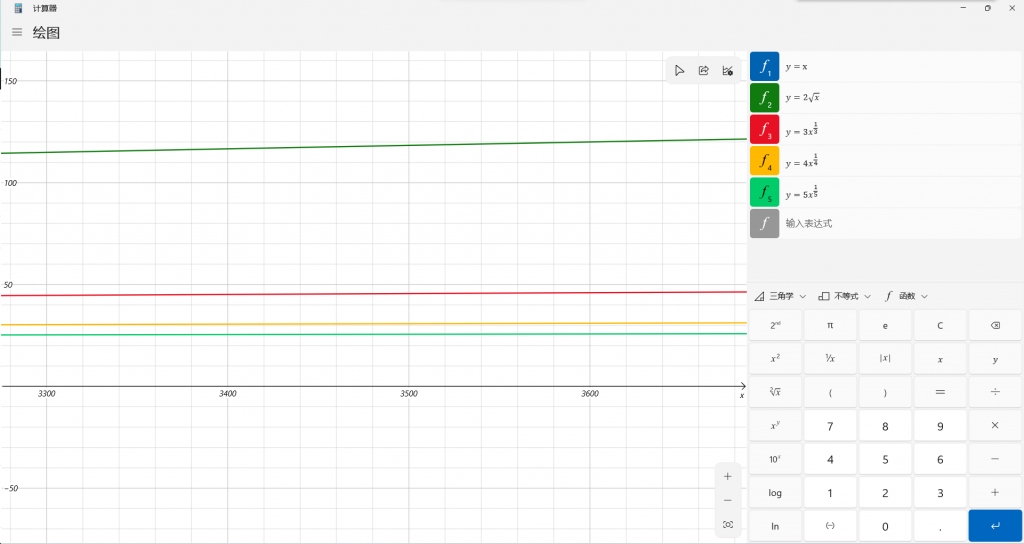
很明显,n越大的时候优化效果更好,例如x=3600时,n从2到5依次得出的y值为120,46,31和26(经过四舍五入)。当n为5时,优化比例达到了0.72%。举一个更夸张的例子,当tick达到一亿的时候,n=2时只需要20000,已经是很夸张的优化了,但是当n=5的时候,命令数仅仅需要199,达到了百万分之一级别的优化。n=4的效果也不差,为400。也就是说,只需要每tick执行短短199条命令,就可以穷举出一亿tick(即不到四年时间内)的所有位置。
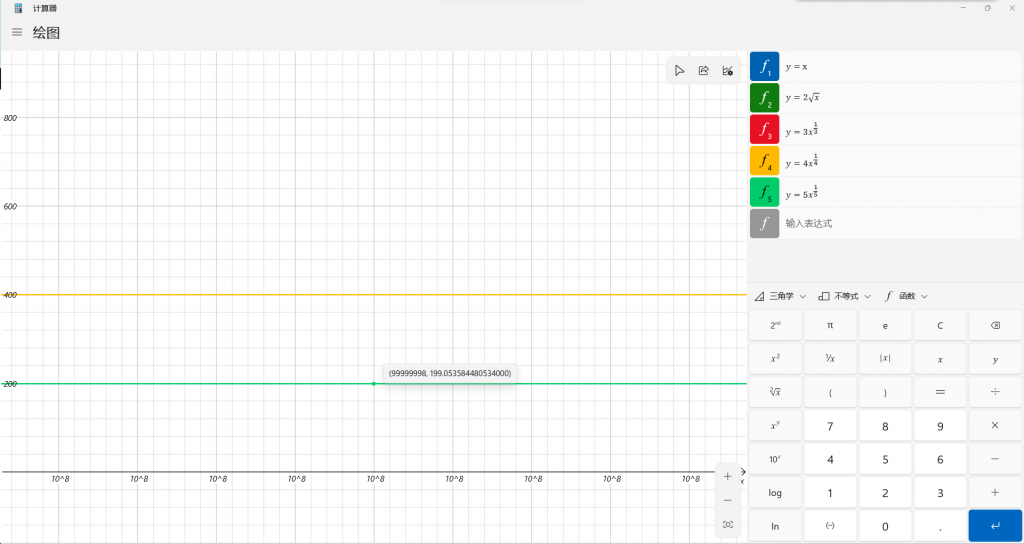
当然,这个方法的缺点便是,显而易见的用空间换时间。但事实上这并不会成为硬伤。如果即使真的有一亿tick,则需要995个文件来穷举,也就不到1MB的储存空间,和其节约下来的时间和性能来说,简直是可以忽略不计!
对于函数中命令的分类,当然是编写一个程序来啦(手写会写死人的啊)
使用
数据包默认使用计分板SV_timer来进行计时,每条曲线分别以$SV_timer_<曲线名字>的形式来命名积分项。其中曲线的名字将在后面说到。
数据包的结构分为四大部分。第一部分为functions文件夹下直接的load、tick函数以及一个exe加上运行需要的dll文件。这个exe文件即为曲线生成程序,将用于读取曲线文件,并生成函数文件,供mc调用执行。第二部分为visual文件夹下的json文件,即前面所说的曲线文件,包含了计算这个曲线在某一tick所需要的信息。json文件的名字即为曲线的名字。第三部分为visual文件夹下的funcs文件夹中的python脚本文件,主要用于曲线的计算,供曲线生成程序调用。第四部分为visual文件夹下的output中的函数,这便是生成的曲线函数,mc将调用其中的命令函数控制曲线运动。每个曲线的函数将被分别储存至以曲线名字命名的文件夹中。
由于下面的部分是按照顺序来写的,所以理解的时候可能会因为不明白原理而感到费解,建议先放着不懂的地方继续看。如果没有看懂,最后有一个小小的例子,可以帮助理解。
第一部分
load函数没有什么可以说的内容,就是初始化SV_timer这个默认计分板。tick函数用于控制曲线运动的计时器,它看起来是这样的:
#自己加控制分数增长的哦
#太懒了没有写
#circle
execute if score \$SV_timer_circle SV_timer matches 0.. run scoreboard players add \$SV_timer_circle SV_timer 1
#line
execute if score \$SV_timer_line SV_timer matches 0.. run scoreboard players add \$SV_timer_line SV_timer 1
#视角控制
function svisual:visual/output/circle/tick
function svisual:visual/output/line/tick
前两条命令用于控制circle和line两条曲线的计分板计时器的增加,后两条曲线则进行曲线的移动控制。值得注意的是,在生成了曲线以后,需要向tick中手动添加函数。
接下来就是重头戏,生成曲线的程序了。打开exe文件以后,应该会看到这样的界面:
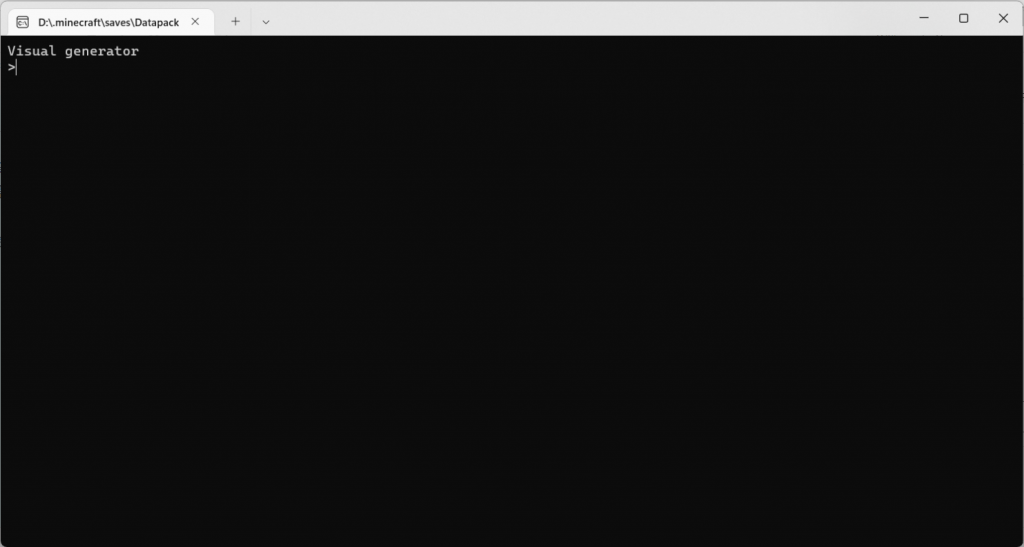
接下来,只需要输入曲线的名字,按下enter键,就能开始生成曲线了。
第二部分
这些json文件中按照json格式储存了曲线的信息。一个json文件的样例是这样的。
{
    "$schema": "./schema.json",
    //这是一个配置文件的格式说明
    "relative":true,    //是否相对运动,即设置一个运动的实体,然后运动坐标为相对这个实体的坐标。
    "o":"@e[tag=point]",    //如果是相对运动,则填写一个目标选择器,选择要相对哪个实体运动
    "s":"@p",           //运动的实体,是一个目标选择器
    "scoreboard":{
        //计分板使用,可选。如没有此项,则默认为SV_timer计分板和$SV_timer_^func^积分项
        "object":"SV_timer",    //计时用计分板
        "player":"$SV_timer_^func^" //积分项,^func^为占位符,在生成时被替换为配置文件名
        //例如,对这个配置文件而言,$SV_timer_^func^将会在生成的时候被替换为\$SV_timer_example
    },
    "start":[1,2,3,50,-30], //初始位置
    "time":333, //运动所用的总时间
    "events":[
        //运动事件的列表,包含了数个事件,用于控制坐标的变化
        {
            "by":false, //是否在原来的基础上运动(未实现,暂时没有作用)
            "time":128, //事件的开始时间(tick)
            "last":70,  //持续时间(tick)
            "moves":[
                //每个坐标轴的事件分别列出。注意,一个坐标轴只能有一个事件,并且不同关键帧之间的坐标轴的事件之间时间不能重合
                //但是即使重合程序也不会报错
                {
                    "axis":"y", //哪个坐标轴(rx ry为旋转轴)
                    "func":"line",  //缓动函数的名字,函数储存在func下,可以自定义
                    "to":3  //目标
                }
            ]
        }
    ]
}
值得注意的是,第一项,即”$schema”能用于vscode检查json格式和自动补全这个json。其值除了能填写为”./schema.json”(本地文件)以外,还能填写为”https://alumopper.top/res/json/schema”(在线检查)。
在生成曲线的时候,程序将读取这个json文件并将其翻译为命令函数。
第三部分
funcs文件夹下存放了许多python脚本文件,这些脚本文件是用来帮助程序进行坐标计算的,同时这样的做法也实现了高度的自定义能力。一个能被曲线生成程序解释运行的python脚本应当是这样的:
# -*- coding: UTF-8 -*-
#这是一个样例,说明了怎么让脚本接入C#的程序
import math         #你可以导入一些库,没有关系的

def func(start,end,last,curr):          #注意这四个参数和函数的名字
    #start  ->起始的位置
    #end    ->结束的位置
    #last   ->事件持续时间
    #curr   ->现在的时间(相对事件开始的时间)

    #.....一些简单的处理

    return #something 返回一个值
    #事件函数的处理只处理了xyz或者rx ry中的一个
程序在计算坐标的时候,会从json文件的events列表中读取所有的事件和start数组中储存的初始坐标值。计算坐标的过程是这样的,首先从0tick开始进行递增,每次都检测一下这一tick中是否有移动事件,如果没有,就说明这一tick没有发生移动,那么坐标和上一个tick一样。如果有,那么就根据事件开始的坐标(之前已经计算得出的)和事件结束的坐标(一个event中的move列表下对应坐标轴的to值),以及现在相对事件开始的tick数(例如现在是15tick,事件从10tick开始,那么相对事件开始的tick数便是5tick)和事件的总tick时长,来计算出这个tick的位置。每一个tick的坐标将会被储存到一个坐标的列表中,按照tick的顺序储存。
python脚本中函数的四个参数分别就对应了前面提到的四个数值,程序获取到这些值后,将其传入对应的python脚本(需要调用哪个脚本通过moves下的func决定),并解释运行获得其返回值。例如,我们以最简单的运动——线性运动来说明:
# -*- coding: UTF-8 -*-
#线性变化

def func(start,end,last,curr):
    delt = end - start
    delt /= last
    return delt*curr+start
线性运动就是沿着一条直线的匀速直线运动。假如这个事件作用于x轴,事件时长为100(即last是100),事件开始时的坐标为0,结束时的坐标为100,那么在相对时间的第currtick的位置,就可以通过脚本算出为curr(100/100*curr+0)。程序接受这个返回值,并将这个返回值作为此tick的坐标储存起来。
第四部分
最后一部分便是程序生成的一大堆的命令函数文件了。然而你甚至不用去打开这个文件夹。这个文件夹里面唯一有用的文件便是一个tick.mcfuntion。这个函数是分层穷举的最顶部的一层,用于控制整个曲线的轨迹。这个函数的路径相当的固定,即svisual:visual/output/<曲线名字>/tick。因此我说,你甚至不用打开这些文件夹看这些密密麻麻的函数文件,只需要在外部调用即可。
使用例(教程)
看了那么多的原理和理论,现在我们来做一个曲线来加深理解吧。我们要做的是一个非常简单的曲线,即一个物体绕着另一个物体做椭圆运动,被环绕的物体同时沿直线运动。
很显然这是一个复合运动,我们首先需要做一个直线运动,然后在以这个直线运动的实体,做一个相对这个实体的椭圆运动。这用relative是能够很轻松地办到的。
为了方便,我们设直线从(0,80,0)运动到(50,80,0),椭圆的长轴为20,短轴为10。总的运动时间为200。
直线运动
首先需要写的便是json文件。因为直线运动的是绝对坐标,因此relative项应当是false,而运动的实体s我们不妨设置为一个带有center标签的实体,即@e[tag=center]。start为[0,80,0,0,0],time为200。由于一直是直线运动,因此events中只会写一个事件。这个事件从0tick开始,持续200tick的事件,运动的轴为x,运动的方式为线性,因此需要调用的脚本为line.py,即func为line,运动的目的地为50。于是,我们便能写出这个直线运动的json如下:
{
    "$schema": "https://alumopper.top/res/json/schema",
    "relative":false,
    "s":"@e[tag=center]",
    "start":[0,80,0,0,0],
    "time":200,
    "events":[
        {
            "by":false,
            "time":0,
            "last":200,
            "moves":[
                {
                    "axis":"x",
                    "func":"line",
                    "to":50
                }
            ]
        }
    ]
}
我们不需要额外写脚本,因为这样简单的脚本数据包中已经自带了。还有一个名为ease_in_out的脚本,实现了基本的缓动效果。其他的脚本均需要使用者自己编写。
椭圆运动
椭圆运动稍显复杂一些,因为涉及到了两个轴的相对运动,同时需要的脚本也需要自己编写。不过这仍然不会难到那里去。首先依然是编写json文件。椭圆运动的json文件和直线运动相似,但是relative应当为true,因为这是相对于上文直线运动实体的椭圆运动,同时还需要多设置一个键o为@e[tag=center],即上文中进行直线运动的实体。这个椭圆运动的实体我们设为带有rander标签的实体。现在来写事件。因为总是在做椭圆运动,我们仍然只需要写一个事件,只是在这个事件中需要写两个坐标轴的运动而已。我们设x轴运动使用的脚本名字为circle_5_x,y轴为circle_5_y(虽然但是,椭圆的英文不是circle)。
值得注意的是,这里的椭圆运动有一点不一样的地方,便是坐标不用受到起始坐标和重点坐标的影响。这很容易理解的,让我们看看计算椭圆坐标需要的参数方程(可能需要一点数学基础):
$\left\{\begin{matrix}x=20sin(10\pi t)\\y=10cos(10\pi t)\end{matrix}\right.$
这里我们用$10\pi t$的原因是为了让它转五圈,这样效果更好一些。可以看到,两个坐标的计算只和t的取值有关,和起始坐标以及终点坐标没有关系。因此,这个json文件中的start数组的xy坐标和event中的to可以随便写一个数字,反正不会有任何影响。(z不能乱写,因为这个事件不会控制z的坐标,如果你把z写成了514,你就很可能找不到进行椭圆运动的实体了!)于是我们就能写出这个曲线的json文件为:
{
    "$schema": "https://alumopper.top/res/json/schema",
    "relative":true,
    "o":"@e[tag=center]",
    "s":"@e[tag=rander]",
    "start":[0,0,0,0,0],
    "time":200,
    "events":[
        {
            "by":false,
            "time":0,
            "last":200,
            "moves":[
                {
                    "axis":"x",
                    "func":"circle_5_x",
                    "to":0
                },
                {
                    "axis":"y",
                    "func":"circle_5_y",
                    "to":0
                }
            ]
        }
    ]
}
其次就是脚本的编写。因为已经给出了参数方程,因此很容易能写出两个python文件为:
circle_5_x:
# -*- coding: UTF-8 -*-
# 圆
import math
import sys
def func(start,end,last,curr):
    delt = curr/last
    return 20*math.sin(delt*10*math.pi)
circle_5_y:
# -*- coding: UTF-8 -*-
# 圆
import math

def func(start,end,last,curr):
    delt = curr/last
    return 10*math.cos(delt*10*math.pi)
生成曲线
现在,打开曲线生成的程序,输入line和circle(即两个运动的json文件名),确认生成json文件。
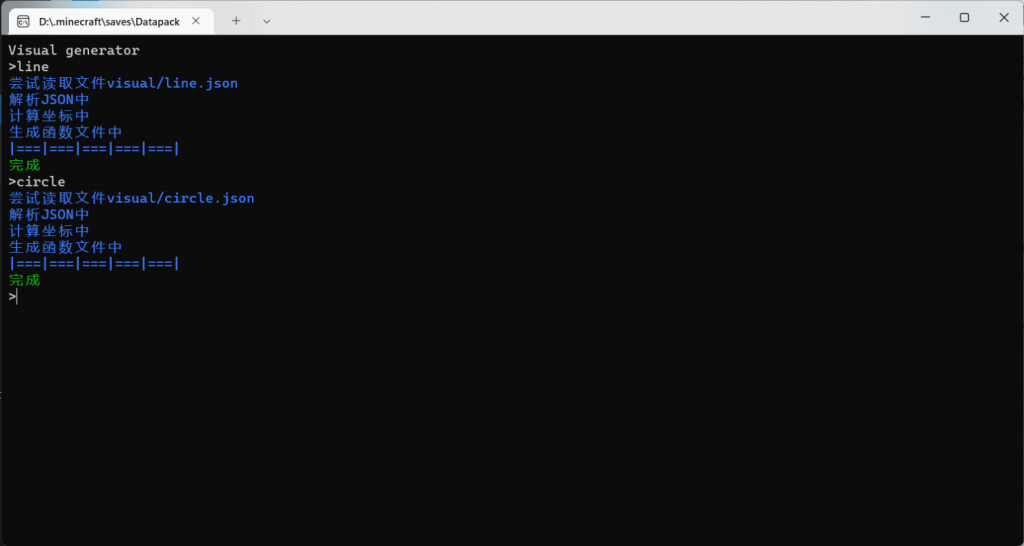
最后,向tick中添加相关的命令,来将曲线运动并入数据包中从而能被调用。
#circle
execute if score \$SV_timer_circle SV_timer matches 0.. run scoreboard players add \$SV_timer_circle SV_timer 1
#line
execute if score \$SV_timer_line SV_timer matches 0.. run scoreboard players add \$SV_timer_line SV_timer 1
#视角控制
function svisual:visual/output/circle/tick
function svisual:visual/output/line/tick
好啦,现在进入游戏,加载数据包,生成两个盔甲架,一个带有center标签,一个带有rander标签,然后将$SV_timer_circle和$SV_timer_line分数同时设置为0,从而启动曲线运动。然后就欣赏空中运动的盔甲架吧!
下载
P.S.
在下载到的数据包中,已经包含了本文所含的例子。
关于settings.json
如果你观察够仔细,你会发现在和exe同级文件夹下会有一个叫做settings的一个json文件,如果你没有对其做任何修改,它应该是这样的:
{
    "paths":[
        "./DLLs",
        "./Lib"
    ]
}
这个设置文件目前只有一个paths设置项,其中的字符串表示python库的位置。有的时候,需要第三方库的时候,因为IronPython的缺陷,不能自动识别,因此需要手动设置路径。字符串中既可以填写相对路径也能填写绝对路径。
源码
曲线生成的程序的源码如下:
using System;
using System.Collections.Generic;
using System.Linq;
using System.Text;
using System.Threading.Tasks;
using IronPython.Hosting;
using Microsoft.Scripting.Hosting;
using Newtonsoft.Json;
using Newtonsoft.Json.Linq;
using System.IO;
namespace DLMCviewer
{
class Program
{
//struct Pos
//{
// public double[5] pos;
// public double x, y, z; //坐标
// public double rx, ry; //旋转角度
// public Pos(double x, double y, double z, double rx, double ry)
// {
// this.x = x; this.y = y; this.z = z;
// this.rx = rx; this.ry = ry;
// }
//}
struct Event
{
//关键帧
public bool by;
public int time, last;
public List<Move> moves;
public Event(bool by, int time, int last, List<JToken> moves)
{
this.by = by;
this.time = time;
this.last = last;
this.moves = new List<Move>();
//处理移动
foreach (JToken single in moves)
{
this.moves.Add(new Move(single["axis"].ToString(), time, last, (double)single["to"], single["func"].ToString()));
}
}
}
struct Move
{
//移动事件
public string axis; //移动的轴
public int time, last; //触发时间和持续时间
public double to; //目标
public dynamic ptfuncs;
public Move(string axis, int time, int last, double to, string ptfuncs)
{
this.axis = axis;
this.time = time;
this.last = last;
this.to = to;
this.ptfuncs = pyEngine.ExecuteFile(@"visual/funcs/" + ptfuncs + ".py");//读取脚本文件
}
}
static ScriptEngine pyEngine = Python.CreateEngine(); //创建Python解释器对象
static List<Event> events = new List<Event>(); //事件
static List<List<Move>> moves = new List<List<Move>>(); //五条轴的移动
static void Main(string[] args)
{
//设置读取
JObject opt = JObject.Parse(File.ReadAllText(@"settings.json"));
//paths
List<JToken> jops = opt["paths"].ToList();
List<string> paths = new List<string>();
foreach(JToken p in jops)
{
paths.Add(p.ToString());
}
Console.Write("Visual generator\n");
while (true)
{
Console.Write(">");
//逻辑循环
string command = Console.ReadLine();
switch (command)
{
case "/debug":
{
Console.ForegroundColor = ConsoleColor.Yellow;
pyEngine = Python.CreateEngine(); //创建Python解释器对象
ICollection<string> Paths = pyEngine.GetSearchPaths();
Paths = Paths.Union(paths).ToList();
pyEngine.SetSearchPaths(Paths);
dynamic ptfuncs = pyEngine.ExecuteFile(@"visual/funcs/qwq.py");//读取脚本文件
Console.WriteLine(ptfuncs.get_sys_path());
Console.ResetColor();
break;
}
case "/list":
{
Console.ForegroundColor = ConsoleColor.Blue;
Console.WriteLine("可用文件:");
string rootpath = Directory.GetCurrentDirectory();
rootpath += "/visual";
FileInfo[] fileInfos = new DirectoryInfo(rootpath).GetFiles("*.json");
foreach(FileInfo f in fileInfos)
{
Console.WriteLine(f.Name);
}
Console.ResetColor();
break;
}
case "/f":
{
//刷新设置
opt = JObject.Parse(File.ReadAllText(@"settings.json"));
//paths
jops = opt["paths"].ToList();
paths = new List<string>();
foreach (JToken p in jops)
{
paths.Add(p.ToString());
}
break;
}
default:
{
if (command.StartsWith("/"))
{
Console.ForegroundColor = ConsoleColor.Red;
Console.WriteLine("未知的命令:"+command);
Console.ResetColor();
break;
}
try
{
#region 初始化
pyEngine = Python.CreateEngine(); //创建Python解释器对象
ICollection<string> Paths = pyEngine.GetSearchPaths();
Paths.Concat(paths);
pyEngine.SetSearchPaths(Paths);
events = new List<Event>(); //事件
moves = new List<List<Move>>
{
new List<Move>(),
new List<Move>(),
new List<Move>(),
new List<Move>(),
new List<Move>()
}; //五条轴的移动
#endregion
#region 文件读取
Console.ForegroundColor = ConsoleColor.Blue;
Console.WriteLine("尝试读取文件" + "visual/" + command + ".json");
//文件读取
JObject jo = JObject.Parse(File.ReadAllText(@"visual/" + command + ".json"));
List<JToken> joevents = jo["events"].ToList();
/*
* 事件格式
{
"by":false,
"time":128,
"last":70,
"func":"line",
"to":{
"pos":[1,3,8],
"rot":[50,-40]
}
}
*/
#endregion
#region 解析Json
Console.WriteLine("解析JSON中");
//获取事件
foreach (JToken j in joevents)
{
events.Add(new Event((bool)j["by"], (int)j["time"], (int)j["last"], j["moves"].ToList()));
}
//对五条轴分别处理事件
foreach (Event e in events)
{
foreach (Move m in e.moves)
{
switch (m.axis)
{
case "x":
{
moves[0].Add(m);
break;
}
case "y":
{
moves[1].Add(m);
break;
}
case "z":
{
moves[2].Add(m);
break;
}
case "rx":
{
moves[3].Add(m);
break;
}
case "ry":
{
moves[4].Add(m);
break;
}
}
}
}
#endregion
#region 计算坐标
Console.WriteLine("计算坐标中");
//生成开始
List<double[]> poslist = new List<double[]>();
//初始化坐标序列
for (int i = 0; i <= (int)jo["time"]; i++)
{
poslist.Add(new double[5]);
}
//Pos start = new Pos((int)jo["start"]["pos"][0], (int)jo["start"]["pos"][1], (int)jo["start"]["pos"][2], (int)jo["start"]["rot"][0], (int)jo["start"]["rot"][1]);
//poslist.Add(start);
//分别处理五条轴的变化
for (int i = 0; i < 5; i++)
{
double start = (double)jo["start"][i];
double movestart = 0; //移动起始的位置
poslist[0][i] = start;
for (int t = 1; t <= (int)jo["time"]; t++)
{
if (HasMove(t, out Move m, i))
{
//如果有移动事件发生
if (m.time == t)
{
//特别的,是移动开始的时候
movestart = poslist[t - 1][i];
poslist[t][i] = poslist[t - 1][i];
}
else
{
//事件进行中~调用脚本开始计算
poslist[t][i] = m.ptfuncs.func((double)movestart, (double)m.to, (double)m.last, t - m.time);
}
}
else
{
//没有移动事件的发生
poslist[t][i] = poslist[t - 1][i];
}
}
}
#endregion
#region 生成函数文件
Console.Write("生成函数文件中\n|");
//删除旧文件
DirectoryInfo dir = new DirectoryInfo("visual/output/" + command);
FileSystemInfo[] fileinfo = dir.GetFileSystemInfos(); //返回目录中所有文件和子目录
foreach (FileSystemInfo i in fileinfo)
{
if (i is DirectoryInfo)
{
//判断是否文件夹
DirectoryInfo subdir = new DirectoryInfo(i.FullName);
subdir.Delete(true); //删除子目录和文件
}
else
{
File.Delete(i.FullName); //删除指定文件
}
}
//生成命令
//0~4不嵌套 5~11 12~31 31~86 87~237 238~
int each = (int)(Math.Pow((int)jo["time"], 0.2) + 1); //函数分片
//函数被压缩为5片
Directory.CreateDirectory("visual/output/" + command);
string s = jo["s"].ToString(); //移动实体
string sbobject, sbplayer;
if(jo["scoreboard"] == null)
{
sbobject = "SV_timer";
sbplayer = "$SV_timer_" + command;
}
else
{
sbobject = jo["scoreboard"]["object"].ToString(); //计分板项
sbplayer = jo["scoreboard"]["player"].ToString(); //计分项
//替换占位符
sbplayer = sbplayer.Replace("^func^", command);
}
if ((bool)jo["relative"])
{
//如果是相对运动
string o = jo["o"].ToString(); //对齐的中心点
int nextlevel = -1; //文件个数
FileStream fileStream;
StreamWriter writer = null;
for (int i = 0; i < poslist.Count; i++)
{
if (i % each == 0)
{
if (!(writer == null))
{
writer.Flush();
writer.Close();
}
//生成文件
nextlevel++;
fileStream = new FileStream("visual/output/" + command + "/0_" + nextlevel + ".mcfunction", FileMode.Append, FileAccess.Write, FileShare.ReadWrite);
writer = new StreamWriter(fileStream);
}
//写入
//execute if score $SV_timer_"+command+" DL_camara matches 0 at @e[tag=DL_camara] run tp @p ~ ~ ~ ~ ~
string line = "execute if score "+sbplayer+" "+sbobject+" matches " + i + " at "+o+" run tp "+s+" ~" + ((decimal)poslist[i][0]).ToString() + " ~" + ((decimal)poslist[i][1]).ToString() + " ~" + ((decimal)poslist[i][2]).ToString() + " ~" + ((decimal)poslist[i][3]).ToString() + " ~" + ((decimal)poslist[i][4]).ToString();
writer.Write(line + "\n");
}
writer.Flush();
writer.Close();
writer = null;
Console.Write("===|");
//第二层
//每{each}个函数文件为一组
int thislevel = nextlevel;
nextlevel = -1;
for (int i = 0; i <= thislevel; i++)
{
if (i % each == 0)
{
if (!(writer == null))
{
writer.Flush();
writer.Close();
}
//生成文件
nextlevel++;
fileStream = new FileStream("visual/output/" + command + "/1_" + nextlevel + ".mcfunction", FileMode.Append, FileAccess.Write, FileShare.ReadWrite);
writer = new StreamWriter(fileStream);
}
//写入
//execute if score $SV_timer_"+command+" SV_timer matches 0..5 run function svisual:visual/output/test/0_0
string line = "execute if score "+ sbplayer + " "+sbobject+" matches " + i * each + ".." + ((i + 1) * each - 1) + " run function svisual:visual/output/"+command+"/0_" + i;
writer.WriteLine(line);
}
writer.Flush();
writer.Close();
writer = null;
Console.Write("===|");
//第三层
//每{each}个函数文件为一组
thislevel = nextlevel;
nextlevel = -1;
for (int i = 0; i <= thislevel; i++)
{
if (i % each == 0)
{
if (!(writer == null))
{
writer.Flush();
writer.Close();
}
//生成文件
nextlevel++;
fileStream = new FileStream("visual/output/" + command + "/2_" + nextlevel + ".mcfunction", FileMode.Append, FileAccess.Write, FileShare.ReadWrite);
writer = new StreamWriter(fileStream);
}
//写入
//execute if score $SV_timer_"+command+" SV_timer matches 0..5 run function svisual:visual/output/test/0_0
string line = "execute if score "+sbplayer+" "+sbobject+" matches " + i * each * each + ".." + ((i + 1) * each * each - 1) + " run function svisual:visual/output/"+command+"/1_" + i;
writer.WriteLine(line);
}
writer.Flush();
writer.Close();
writer = null;
Console.Write("===|");
//第四层
//每{each}个函数文件为一组
thislevel = nextlevel;
nextlevel = -1;
for (int i = 0; i <= thislevel; i++)
{
if (i % each == 0)
{
if (!(writer == null))
{
writer.Flush();
writer.Close();
}
//生成文件
nextlevel++;
fileStream = new FileStream("visual/output/" + command + "/3_" + nextlevel + ".mcfunction", FileMode.Append, FileAccess.Write, FileShare.ReadWrite);
writer = new StreamWriter(fileStream);
}
//写入
//execute if score $SV_timer_"+command+" SV_timer matches 0..5 run function svisual:visual/output/test/0_0
string line = "execute if score " + sbplayer + " " + sbobject + " matches " + i * each * each * each + ".." + ((i + 1) * each * each * each - 1) + " run function svisual:visual/output/"+command+"/2_" + i;
writer.WriteLine(line);
}
writer.Flush();
writer.Close();
writer = null;
Console.Write("===|");
//第五层
//每{each}个函数文件为一组
thislevel = nextlevel;
nextlevel = -1;
for (int i = 0; i <= thislevel; i++)
{
if (i % each == 0)
{
if (!(writer == null))
{
writer.Flush();
writer.Close();
}
//生成文件
nextlevel++;
fileStream = new FileStream("visual/output/" + command + "/4_" + nextlevel + ".mcfunction", FileMode.Append, FileAccess.Write, FileShare.ReadWrite);
writer = new StreamWriter(fileStream);
}
//写入
//execute if score $SV_timer_"+command+" SV_timer matches 0..5 run function svisual:visual/output/test/0_0
string line = "execute if score " + sbplayer + " " + sbobject + " matches " + i * each * each * each * each + ".." + ((i + 1) * each * each * each * each - 1) + " run function svisual:visual/output/"+command+"/3_" + i;
writer.WriteLine(line);
}
writer.Flush();
writer.Close();
writer = null;
//tick层
thislevel = nextlevel;
nextlevel = -1;
for (int i = 0; i <= thislevel; i++)
{
fileStream = new FileStream("visual/output/" + command + "/tick.mcfunction", FileMode.Append, FileAccess.Write, FileShare.ReadWrite);
writer = new StreamWriter(fileStream);
//写入
//execute if score $SV_timer_"+command+" SV_timer matches 0..5 run function svisual:visual/output/test/0_0
string line = "execute if score " + sbplayer + " " + sbobject + " matches " + i * each * each * each * each * each + ".." + ((i + 1) * each * each * each * each * each - 1) + " run function svisual:visual/output/"+command+"/4_" + i;
writer.WriteLine(line);
}
writer.WriteLine("execute if score " + sbplayer + " " + sbobject + " matches " + (thislevel + 1) * each * each * each * each * each + ".. run scoreboard players set " + sbplayer + " " + sbobject + " -1");
writer.Flush();
writer.Close();
writer = null;
Console.Write("===|\n");
}
else
{
//绝对距离
int nextlevel = -1; //文件个数
FileStream fileStream;
StreamWriter writer = null;
for (int i = 0; i < poslist.Count; i++)
{
if (i % each == 0)
{
if (!(writer == null))
{
writer.Flush();
writer.Close();
}
//生成文件
nextlevel++;
fileStream = new FileStream("visual/output/" + command + "/0_" + nextlevel + ".mcfunction", FileMode.Append, FileAccess.Write, FileShare.ReadWrite);
writer = new StreamWriter(fileStream);
}
//写入
//execute if score $SV_timer_"+command+" DL_camara matches 0 at @e[tag=DL_camara] run tp @p ~ ~ ~ ~ ~
string line = "execute if score " + sbplayer + " " + sbobject + " matches " + i + " run tp " + s + " " + ((decimal)poslist[i][0]).ToString() + " " + ((decimal)poslist[i][1]).ToString() + " " + ((decimal)poslist[i][2]).ToString() + " " + ((decimal)poslist[i][3]).ToString() + " " + ((decimal)poslist[i][4]).ToString();
writer.Write(line + "\n");
}
writer.Flush();
writer.Close();
writer = null;
Console.Write("===|");
//第二层
//每{each}个函数文件为一组
int thislevel = nextlevel;
nextlevel = -1;
for (int i = 0; i <= thislevel; i++)
{
if (i % each == 0)
{
if (!(writer == null))
{
writer.Flush();
writer.Close();
}
//生成文件
nextlevel++;
fileStream = new FileStream("visual/output/" + command + "/1_" + nextlevel + ".mcfunction", FileMode.Append, FileAccess.Write, FileShare.ReadWrite);
writer = new StreamWriter(fileStream);
}
//写入
//execute if score $SV_timer_"+command+" SV_timer matches 0..5 run function svisual:visual/output/test/0_0
string line = "execute if score " + sbplayer + " " + sbobject + " matches " + i * each + ".." + ((i + 1) * each - 1) + " run function svisual:visual/output/"+command+"/0_" + i;
writer.WriteLine(line);
}
writer.Flush();
writer.Close();
writer = null;
Console.Write("===|");
//第三层
//每{each}个函数文件为一组
thislevel = nextlevel;
nextlevel = -1;
for (int i = 0; i <= thislevel; i++)
{
if (i % each == 0)
{
if (!(writer == null))
{
writer.Flush();
writer.Close();
}
//生成文件
nextlevel++;
fileStream = new FileStream("visual/output/" + command + "/2_" + nextlevel + ".mcfunction", FileMode.Append, FileAccess.Write, FileShare.ReadWrite);
writer = new StreamWriter(fileStream);
}
//写入
//execute if score $SV_timer_"+command+" SV_timer matches 0..5 run function svisual:visual/output/test/0_0
string line = "execute if score " + sbplayer + " " + sbobject + " matches " + i * each * each + ".." + ((i + 1) * each * each - 1) + " run function svisual:visual/output/"+command+"/1_" + i;
writer.WriteLine(line);
}
writer.Flush();
writer.Close();
writer = null;
Console.Write("===|");
//第四层
//每{each}个函数文件为一组
thislevel = nextlevel;
nextlevel = -1;
for (int i = 0; i <= thislevel; i++)
{
if (i % each == 0)
{
if (!(writer == null))
{
writer.Flush();
writer.Close();
}
//生成文件
nextlevel++;
fileStream = new FileStream("visual/output/" + command + "/3_" + nextlevel + ".mcfunction", FileMode.Append, FileAccess.Write, FileShare.ReadWrite);
writer = new StreamWriter(fileStream);
}
//写入
//execute if score $SV_timer_"+command+" SV_timer matches 0..5 run function svisual:visual/output/test/0_0
string line = "execute if score " + sbplayer + " " + sbobject + " matches " + i * each * each * each + ".." + ((i + 1) * each * each * each - 1) + " run function svisual:visual/output/"+command+"/2_" + i;
writer.WriteLine(line);
}
writer.Flush();
writer.Close();
writer = null;
Console.Write("===|");
//第五层
//每{each}个函数文件为一组
thislevel = nextlevel;
nextlevel = -1;
for (int i = 0; i <= thislevel; i++)
{
if (i % each == 0)
{
if (!(writer == null))
{
writer.Flush();
writer.Close();
}
//生成文件
nextlevel++;
fileStream = new FileStream("visual/output/" + command + "/4_" + nextlevel + ".mcfunction", FileMode.Append, FileAccess.Write, FileShare.ReadWrite);
writer = new StreamWriter(fileStream);
}
//写入
//execute if score $SV_timer_"+command+" SV_timer matches 0..5 run function svisual:visual/output/test/0_0
string line = "execute if score " + sbplayer + " " + sbobject + " matches " + i * each * each * each * each + ".." + ((i + 1) * each * each * each * each - 1) + " run function svisual:visual/output/"+command+"/3_" + i;
writer.WriteLine(line);
}
writer.Flush();
writer.Close();
writer = null;
//tick层
thislevel = nextlevel;
nextlevel = -1;
for (int i = 0; i <= thislevel; i++)
{
fileStream = new FileStream("visual/output/" + command + "/tick.mcfunction", FileMode.Append, FileAccess.Write, FileShare.ReadWrite);
writer = new StreamWriter(fileStream);
//写入
//execute if score $SV_timer_"+command+" SV_timer matches 0..5 run function svisual:visual/output/test/0_0
string line = "execute if score " + sbplayer + " " + sbobject + " matches " + i * each * each * each * each * each+ ".." + ((i + 1) * each * each * each * each * each - 1) + " run function svisual:visual/output/"+command+"/4_" + i;
writer.WriteLine(line);
}
writer.WriteLine("execute if score " + sbplayer + " " + sbobject + " matches " + (thislevel+1) * each * each * each * each * each + ".. run scoreboard players set " + sbplayer + " " + sbobject + " -1");
writer.Flush();
writer.Close();
writer = null;
Console.Write("===|\n");
}
#endregion
Console.ForegroundColor = ConsoleColor.Green;
Console.WriteLine("完成");
Console.ResetColor();
}
catch (Exception e)
{
Console.ForegroundColor = ConsoleColor.Red;
if (e.GetType() == typeof(NullReferenceException))
{
Console.WriteLine("JSON格式错误");
Console.WriteLine(e.GetType() + ":" + e.Message);
}
else
{
Console.WriteLine(e.GetType() + ":" + e.Message);
}
Console.ResetColor();
}
break;
}
}
}
}
static bool HasMove(int time, out Move @move, int axis)
{
foreach (Move e in moves[axis])
{
if (e.time <= time && time <= e.time + e.last)
{
//如果时间线上有事件
@move = e;
return true;
}
}
@move = new Move();
return false;
}
}
}